
Create Drafts on Poshmark First
Every RelistKit listing starts as a Poshmark draft with photos and nothing else. This article is about the generate step: what RelistKit reads, what it writes, what it refuses to guess, and what it costs.
What RelistKit reads
The RelistKit extension only uploads your photos to the RelistKit website when you start generating new listing details. The AI generator reviews and considers anything it can about the item from your photos, including the brand tag, the size tag, the care label, and any flaws you photographed. It does not search the internet, check your other listings, or read Poshmark's suggestions. Your photos determine the output quality: a clear tag photo gives you the exact brand and size; a blurry one gives you an empty field and a note.
We recommend 8 photos per listing. This gives the generator enough data to review and produce meaningful results, and it gives potential buyers enough context to review the item. Eight also keeps the generation time down; it gets slower if there are more photos in a listing. RelistKit can accept a maximum of 16 images per listing.
If we detect that one of the images is used for marketing, like a graphic promoting your closet, it will be ignored for listing generation and for cross-listing to other platforms.
Before generation begins
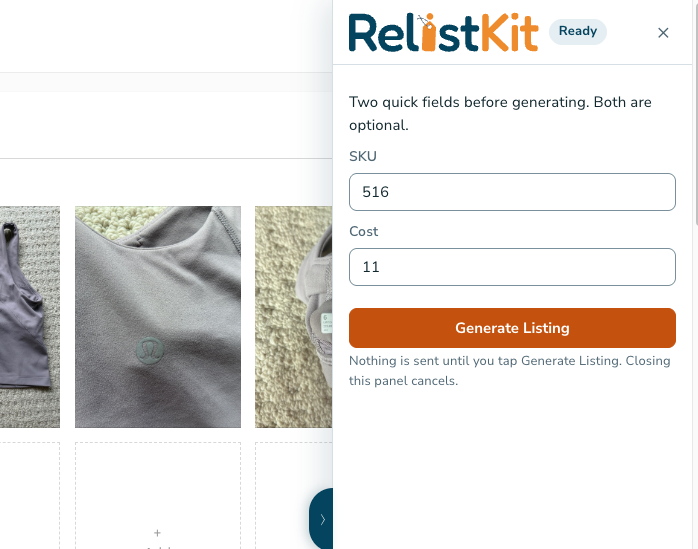
When RelistKit detects a draft listing with no details, it asks for SKU and cost before it will generate a listing. While both are optional, we offer this step because these details are critical for finding the item in your inventory later and for calculating profit, and they're easily missed. We highly recommend populating them with valid records before you generate listing details.
What RelistKit generation writes
Into the Poshmark form: a title in Poshmark's style, a description with the details a buyer asks about (measurements if a tag shows them, material, fit, flaws), brand, category and subcategory, size, up to two colors from Poshmark's palette, and condition (new with tags, or not).
What it never guesses
If it cannot read a detail with confidence, the field stays empty and the panel says so. It will not invent a brand, a size, or a material. That is deliberate. It's always better to not include an uncertain detail than to risk a return or unhappy buyer with wrong information.
The credit
Every generated listing uses 1 credit. Generate again starts over from the photos and costs another credit, so fix small things by hand instead. Your monthly credits and what is left show under Credits in the app.
Your edits win
Anything you change in the listing edit page on Poshmark after generating is what RelistKit remembers, and what it uses when it cross-lists. In the inventory item details in RelistKit, edited items have a tag different from generated fields so that you can easily tell the difference.
Published listings work too
Open any published listing's edit page on Poshmark and the panel is there. Generate rewrites the fields the same way; publish saves the changes.
Common questions
It wrote the wrong brand. Change it in the form. If it happens consistently and is a known brand, open a ticket and let us know.
Can I keep my own description style? Yes. Edit freely; or write the description yourself and only use the other fields. Your text always stays.
Does generating publish anything? No. Nothing goes live until you click Poshmark's own button.