
Fixing Browser Extension Issues
Most extension problems are one of five things. Try the suggestions below in order.
1. Reload the page
After installing or reconnecting, Poshmark, eBay, or Depop tabs that were already open do not know about the extension. Reload the tab.
2. Check if it's connected
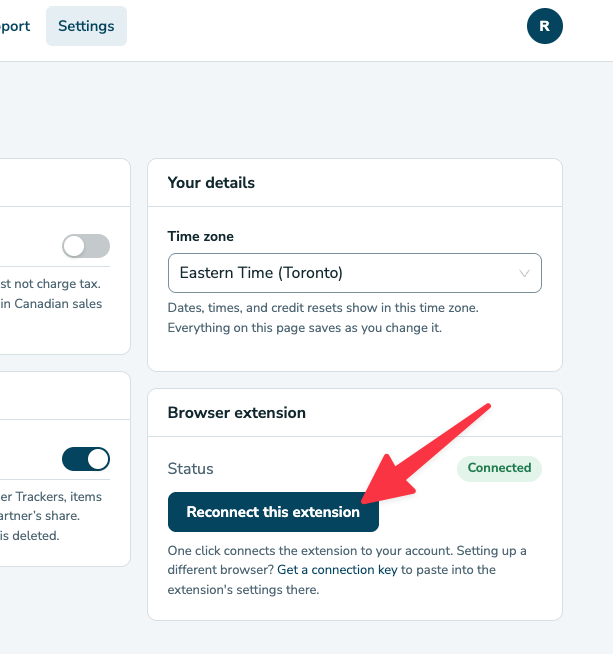
App → Settings → Browser extension. If it does not say Connected, press Connect this extension (or Reconnect this extension). If you connected Chrome long ago and it stopped working, reconnecting creates a fresh connection.
3. Make sure the extension is on
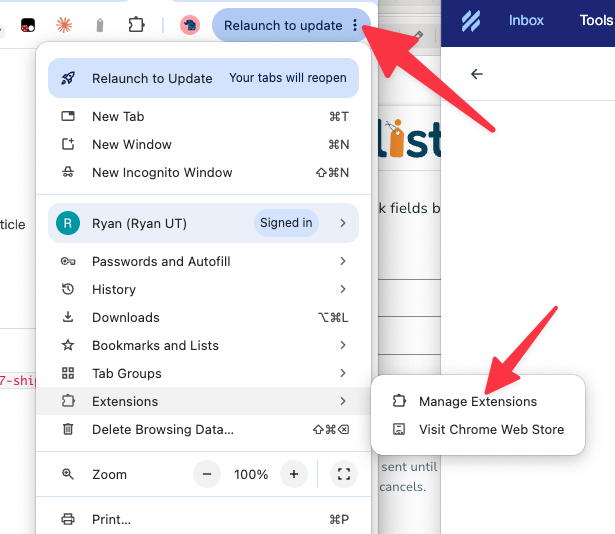
Visit Chrome menu → Extensions → Manage extensions. RelistKit must be on. If Chrome updated and turned it off, turn it on and reload the page.
4. Check you are on the right page
The panel appears on a Poshmark listing form (new draft or edit). The closet button appears only on your own closet page. On eBay and Depop the panel appears when RelistKit opened the tab from a cross-list button; opening eBay's form yourself does not start a fill.
5. Are you signed in?
You must in to Poshmark, eBay, or Depop in Chrome, and signed in to RelistKit. The extension connects to one RelistKit account per Chrome profile.
Specific messages
- "RelistKit could not sign in to its server." The connection was revoked. Press Reconnect this extension under Settings.
- "Waiting for the page" on eBay: let it wait. eBay is slow to load its form.
- A "verify you are human" check during import: complete it yourself in the tab, then press Resume.
- The import stopped when I switched windows. The tab must be in front; bring it back and it continues.