
GST/HST Rport
For registered sellers, RelistKit works out the figures for your GST/HST return, per filing period, from the tax stamped on each sale when you recorded it. They are figures, not advice: confirm them with your accountant before you file. This article explains where to find them and what each line means.
Important: All of the records provided by RelistKit should be confirmed and reviewed by your accountant.
Before you start
- Under Settings → Sales tax, switch on Registered for GST/HST and fill in:
- Province
- GST/HST number
- Filing period
The report only appears for registered sellers.
1. Open the report
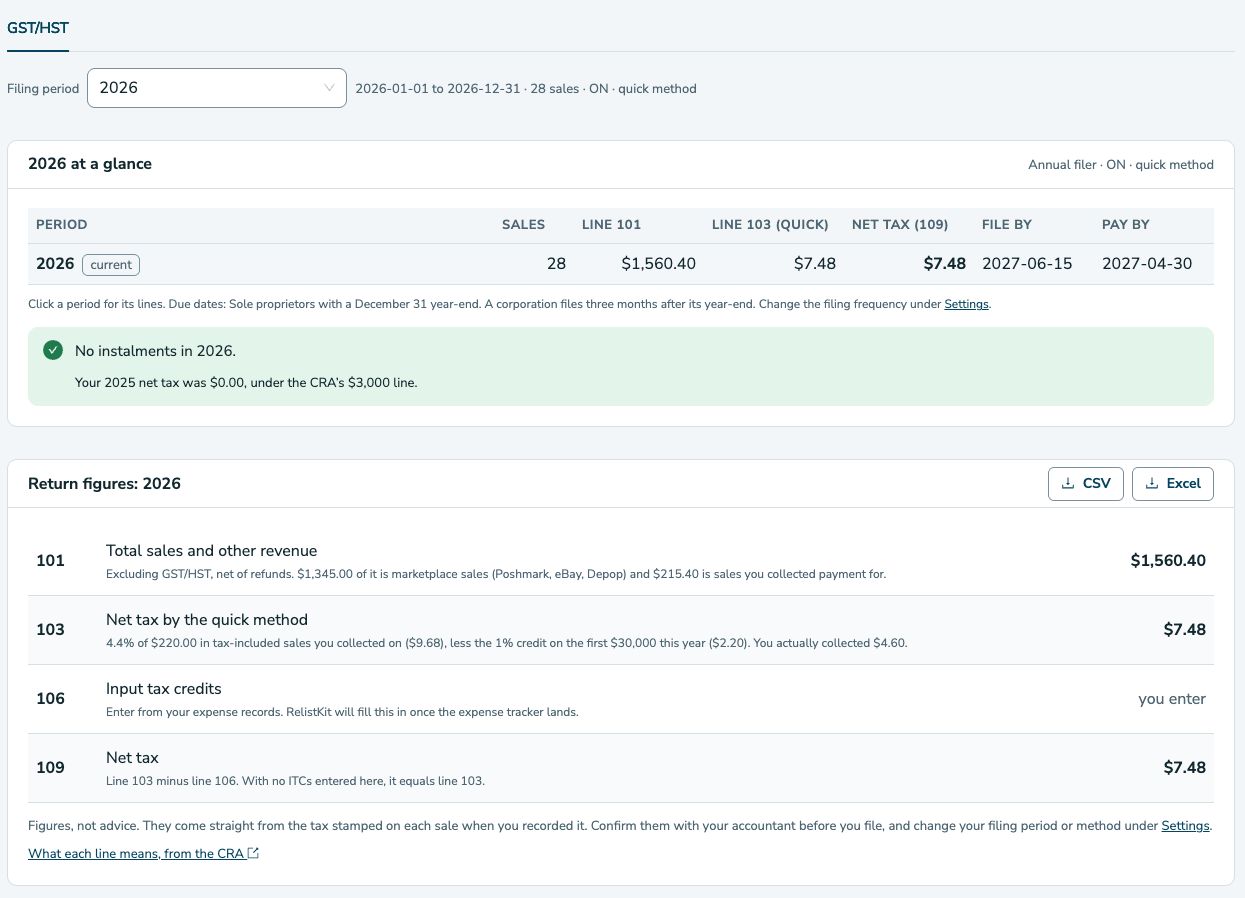
Navigate to Reports → GST/HST. The year at a glance shows one row per filing period, as set under Settings → Sales tax. Each row shows:
- The number of sales
- The three return lines
- The CRA's file-by date
- The CRA's pay-by date
Monthly and quarterly filers file one month after the period ends; annual sole proprietors file by June 15 and pay by April 30.
2. Read a period's lines
Click a period, or select it from the Filing period picker at the top of the report, to see its lines:
- 101, total sales and other revenue: everything you sold in the period, excluding GST/HST, net of refunds. The note splits it into marketplace sales (Poshmark, eBay, Depop) and sales you collected payment for.
- 103, GST/HST collected: the tax stamped on the sales you collected payment for. Marketplace sales carry none.
- 106, input tax credits: the tax you paid on business purchases. RelistKit does not track expenses yet, so this line says "you enter" until the expense tracker arrives.
- 109, net tax: 103 minus 106.
3. Export the period
Click CSV or Excel on the report to download the period's lines for your accountant.
The quick method
If you have elected the quick method with the CRA (common for small businesses that buy goods for resale), switch on the quick method under Settings → Sales tax. Line 103 then becomes your province's remittance rate times your tax-included self-collected sales, less the one percent credit on the first $30,000 each year, and the note shows the actual tax collected beside it.
Instalments
Annual filers whose previous year's net tax was $3,000 or more pay quarterly instalments. The report tells you:
- Whether that applies to you
- How much each instalment is
- When each one is due
RelistKit emails you two weeks before each one.
Common questions
A refund happened after the period.
Refunds reduce line 101 in the period the sale was in. Tax on refunds is not reversed automatically yet; tell your accountant.