
Your GST/HST Return Figures
If you're registered for GST/HST, you file a return with the CRA for each filing period. RelistKit works out the main figures for you, line by line, from the sales, expenses and other income you've recorded, with the dates each return is due. Your GST/HST return figures are part of the Pro plan.
These are RelistKit's figures, not tax advice. Confirm them with your accountant before you file.
Before you start
- You're on the Pro plan.
- Registered for GST/HST is switched on under Settings → Sales tax, with your province and filing period set (see GST/HST: Registered or Not).
See your periods and due dates
- Click Reports in the top menu.
- Click the GST/HST tab.
The first card lists each filing period this year, with its sales, its line 101 and 103 figures, its net tax, and when it's due:
- Monthly and quarterly filers: file and pay one month after the period ends.
- Annual filers: file by June 15 and pay by April 30 of the next year.
A period's figures, line by line
Click a period in the list, or choose one from the Filing period dropdown. The return figures card shows each line:
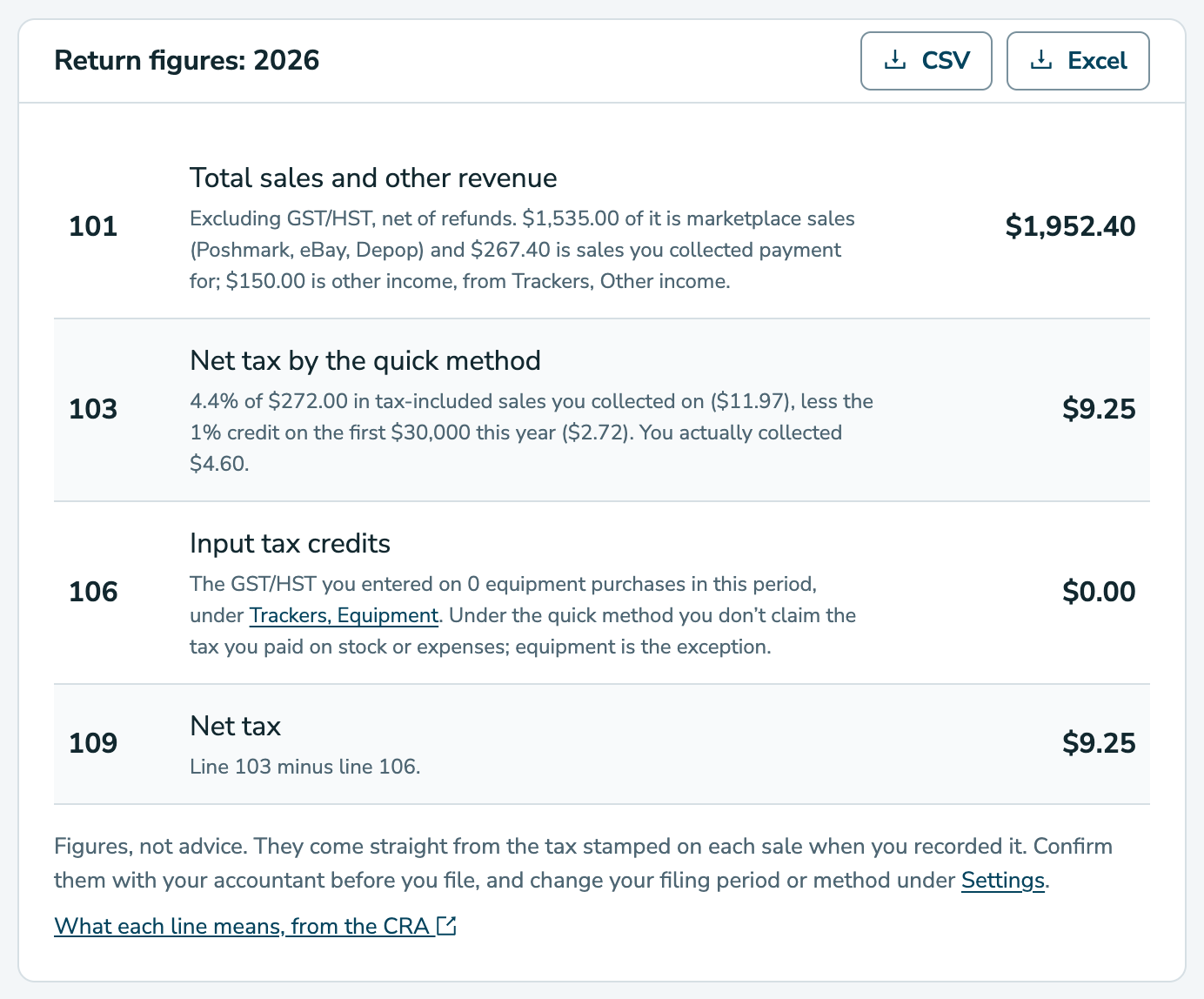
- Line 101, Total sales and other revenue: all your sales before tax, including Poshmark, eBay and Depop, less refunds you gave in the period, plus other income. The note shows how much came from each.
- Line 103, GST/HST collected: the GST/HST on the sales you took payment for yourself, like Facebook Marketplace, less the tax in refunds you gave, plus any GST/HST you charged on other income.
- Line 106, Input tax credits: the GST/HST you entered on expenses, stock purchases and equipment dated in the period. It's what you claim back.
- Line 109, Net tax: line 103 minus line 106. That's what you owe. Below zero, the CRA owes you.
Line 106 only counts the GST/HST you've entered. If it looks low, add the HST in it amount to your expenses, stock purchases and equipment. See Expenses and Stock Purchases.
Click CSV or Excel on the card to download the period's figures. On the Pro plan, Reports → Downloads can include every period of a year (see Year-end Reports for Your Accountant).
On the quick method
If you've switched on I use the quick method, line 103 becomes Net tax by the quick method: a set percentage of your tax-included sales you collected on, less the CRA's 1% credit on your first $30,000 each year. The note also shows the tax you actually collected. Line 106 only counts the tax you paid on equipment.
Instalments
If you file once a year and your net tax last year was $3,000 or more, the CRA expects payments every quarter, called instalments. The GST/HST tab tells you whether instalments apply this year, and how much each one is. They're due April 30, July 31, October 31 and January 31. RelistKit emails you two weeks before each one.
Common questions
Why does line 101 include my Poshmark, eBay and Depop sales?
Line 101 is your total sales, wherever they happened. The marketplaces collected the tax on those sales, so they aren't in line 103. The note under line 101 shows the split for your accountant.
A refund came after I'd filed. What happens?
It counts in the period you gave the refund, not the period of the sale. A period you've already filed never changes.
Why is line 109 below zero?
You paid more GST/HST on your purchases than you collected. Check the figures with your accountant before you file.
Why is line 106 $0?
No GST/HST has been entered on your expenses, stock purchases or equipment in that period. On the quick method, only equipment counts.
Line 103 doesn't match Tax collected.
On the regular method, line 103 matches the GST/HST column of Reports → Tax collected. On the quick method, it's worked out differently, as described above.
I don't see my return figures.
They're part of the Pro plan, and only show when Registered for GST/HST is on. If you're not registered, the GST/HST tab shows the $30,000 threshold instead.