
Money In and Out
Your profit and the money in your bank are rarely the same. Money in and out shows what came in and what went out each month, on the day it happened, including the stock you bought. It's the easiest way to see where your money went. Money in and out is part of the Growth and Pro plans.
This isn't your taxable profit. For the profit the CRA counts, see The Profit and Loss.
Open it
- Click Reports in the top menu.
- Click the Money in and out tab.
- Choose a period from the dropdown at the top. It starts on This year.
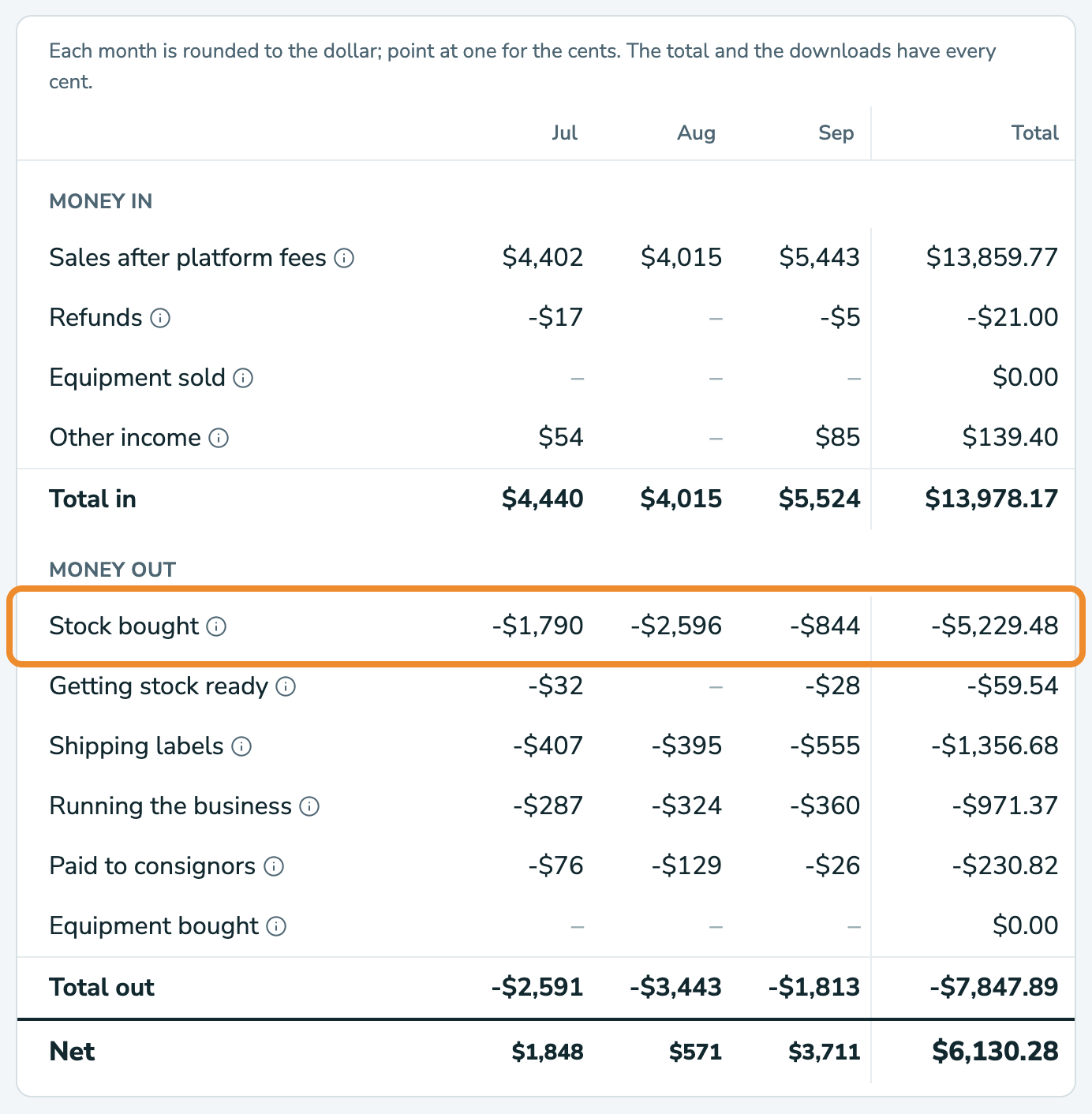
Each month gets its own column, with a Total at the right. You can show up to twelve months at a time. The month columns are rounded to the dollar, so point at one to see the cents. The Total and the downloads have every cent.
What's in it
Money in:
- Sales after platform fees: what each sale paid you after the marketplace's fees, on the day it sold.
- Refunds: what the refunds you gave cost you, on the day you gave them.
- Equipment sold: what you got for equipment you sold.
- Other income: money that isn't a sale, like a styling session.
Money out:
- Stock bought: your stock purchases on the day you bought them, plus items you bought outside a purchase, on their date bought.
- Getting stock ready: cleaning, repairs, and shipping stock to you.
- Shipping labels
- Running the business: your business expenses, tax included.
- Paid to consignors: what you paid the people you sell for, on the day you paid them. It only shows if you sell on consignment.
- Equipment bought
Net is everything that came in, less everything that went out.
How it's different from the profit and loss
- Stock counts here on the day you buy it. In the profit and loss, each item's cost counts when the item sells.
- Equipment you buy or sell shows here. It's never in the profit and loss.
- Consignors count here when you pay them. In the profit and loss, their share counts when their item sells.
- Expenses include the tax you paid.
What isn't in it
- The GST/HST you collect, and what you send the CRA. It's the CRA's money, not yours.
- Your mileage log. Driving isn't money spent.
- When the marketplace pays you. Sales count on the day they sold, so some may reach your bank the month after.
Download it
Click CSV or Excel at the top of the page. The download has every cent.
Common questions
My net is much lower than my profit. Am I losing money?
Not necessarily. Here, stock counts when you buy it. In your profit and loss, it counts as it sells. In a month when you buy a lot of stock, money out is high even though your profit is fine.
Stock bought looks too high, as if a haul counted twice.
If you logged a haul as a stock purchase and also entered a cost on each of its items, add those items to the purchase. Then they count once, in the purchase. See Expenses and Stock Purchases.
It doesn't match my bank.
Sales count on the day they sold, after fees, but marketplaces pay you on their own schedule. RelistKit doesn't connect to your bank.
The months don't add up to exactly the total.
Each month is rounded to the dollar. The Total has every cent. Point at a month to see its cents.
Why can't I choose more than twelve months?
Each month gets a column, so twelve fit at most, like March 1 to the end of February. For a longer stretch, use the profit and loss.