
The $30,000 Threshold
In Canada, once your taxable sales pass $30,000, you have to register for GST/HST and start charging it. If you're not registered, RelistKit adds up the sales that count and lets you know as you get close, so it doesn't sneak up on you. The threshold monitor is part of the Growth and Pro plans.
These are RelistKit's figures, not tax advice. RelistKit doesn't register you or decide anything for you. Ask your accountant what counts for your business.
Which sales count
RelistKit counts the sales you take payment for yourself:
- Facebook Marketplace sales
- sales recorded as Other, like cash sales
Each one counts at its price before tax, less any refunds.
These don't count:
- Poshmark, eBay and Depop sales. Those marketplaces collect the tax and send it in themselves.
- Sales from your own closet. Selling your own used things isn't business.
- Sales waiting under Needs review, until you've checked them.
You can also add sales RelistKit doesn't know about (see below).
Check where you are
- Click Reports in the top menu.
- Click the GST/HST tab.
The Registration threshold card shows how close you are, with a bar that turns orange at 80% and red at 100%:
- Last four quarters: this quarter so far, plus the three before it.
- This year
- This quarter
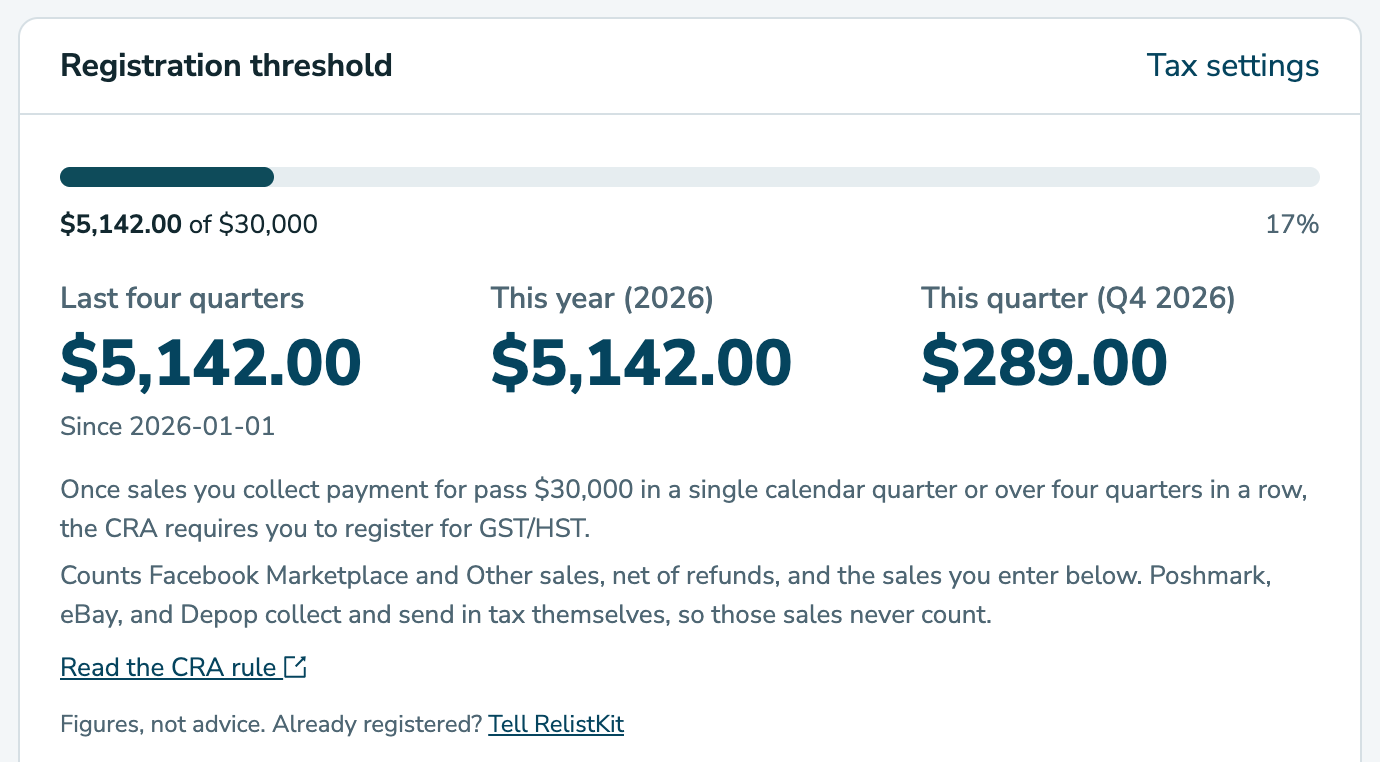
The CRA's rule, as RelistKit shows it: once your sales pass $30,000 in a single calendar quarter, or over four quarters in a row, you need to register. A calendar quarter is January to March, April to June, July to September, or October to December.
RelistKit emails you at 80% of the way, and again if you pass $30,000.
Add sales RelistKit doesn't see
Some sales count toward the $30,000 that RelistKit can't know about:
- sales from before you started using RelistKit
- cash or Facebook Marketplace sales you didn't record
- taxable sales from any other business you run on your own, since the CRA counts them all together
To add them:
- On the GST/HST tab, find Sales RelistKit doesn't see.
- Click the box for the quarter.
- Type the total for that quarter, before tax. Leave out Poshmark, eBay and Depop sales.
- Press Enter, or click somewhere else. It saves by itself.
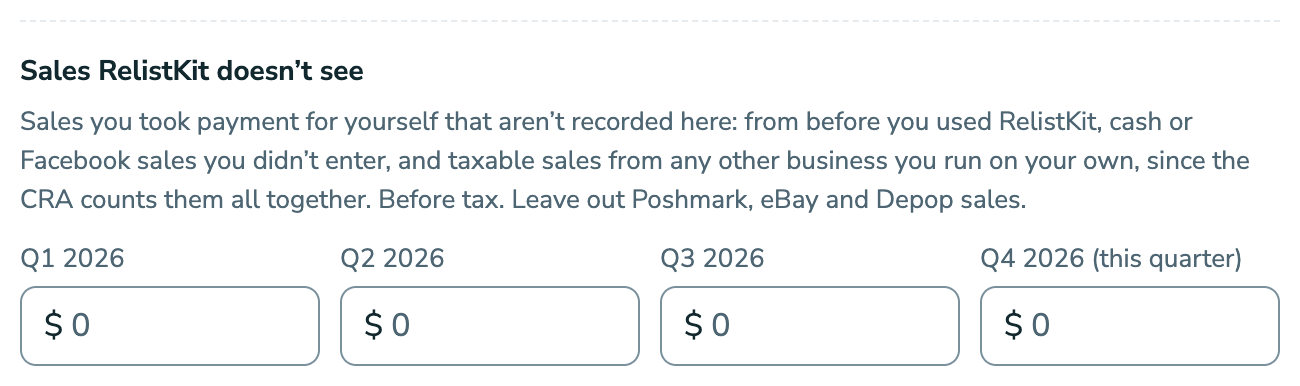
A quarter drops out of the total by itself as time passes.
When you register
If you pass $30,000, read the CRA rule (the card links to it), and register with the CRA. Then tell RelistKit:
- On the GST/HST tab, click I've registered (or Tell RelistKit, under the card).
- Check that the Province or territory is yours.
- Add your GST/HST number if you have it. You can add it later under Settings.
- Click I'm registered.
From then on, RelistKit adds GST/HST to the Facebook Marketplace sales you record. Sales from before don't change. The monitor goes away, and on the Pro plan, the GST/HST tab shows your return figures instead. See GST/HST: Registered or Not.
Common questions
Why don't my Poshmark, eBay and Depop sales count?
Those marketplaces collect the sales tax and send it in themselves, so RelistKit leaves them out. If you sell a lot outside Canada, ask your accountant whether that changes anything for you.
I started using RelistKit partway through the year.
Add your earlier Facebook, cash and other self-collected sales under Sales RelistKit doesn't see, quarter by quarter.
My total went down. Why?
A refund or cancellation came off, or an older quarter dropped out of the last four.
I don't see the threshold monitor.
It's on the Growth and Pro plans, and only shows while you're not registered for GST/HST. Check Settings → Sales tax.
Does my other income count?
RelistKit doesn't add it. Ask your accountant whether it should, and if so, add it under Sales RelistKit doesn't see.