
Cross-list to Depop
From an item's page in RelistKit, one button opens Depop's listing form and fills it out for you. To cross-list to Depop, you must be signed in to Depop in Chrome, and Depop must be switched on under Settings → Cross-listing platforms. We also suggest making square versions of your photos first (see Before You Cross-list). Cross-listing to Depop is part of the Starter, Growth and Pro plans.
1. Click Cross-list on Depop
Open the item from Inventory → Items in RelistKit, then click Cross-list on Depop on the right side of the page. A new tab opens on Depop's List an item page. Keep it in front while it fills: Depop only uploads photos while its tab is showing.
2. What fills
RelistKit fills in:
- up to 8 photos, using your square versions
- the description: your title first, then your description, then up to 5 hashtags made from your style tags
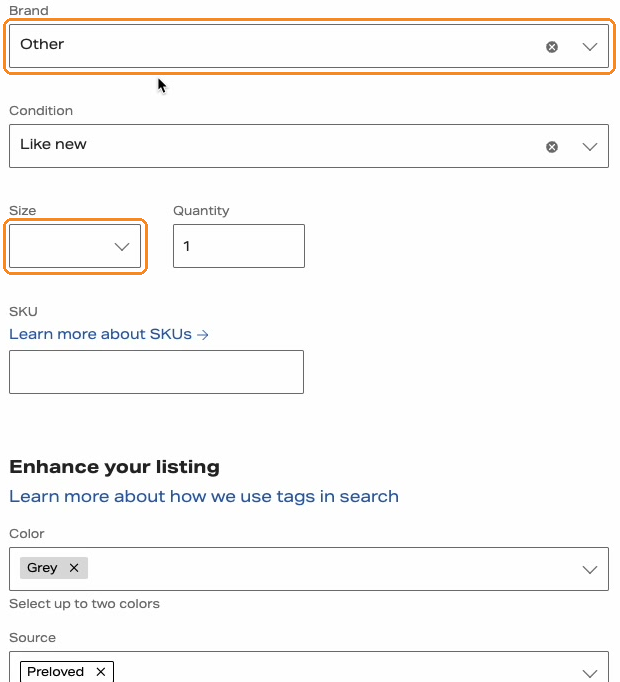
- the category, size, condition, colour and brand
- the source (like Preloved) and age, where it can tell
- the price, from your pricing rules
- your city, once you've picked it on Depop once
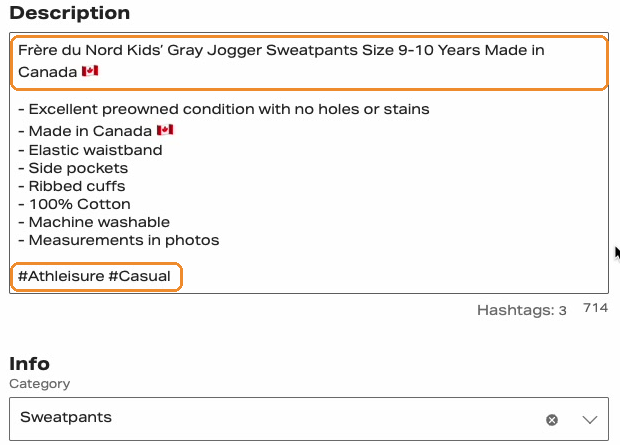
Two translations happen on the way:
- Sizes. Depop uses its own size names. Plus sizes on Poshmark become Depop's: 1X becomes XL and 2X becomes XXL. Numeric sizes map where Depop has them. Jewellery and watches have no size on Depop.
- Categories. Depop's categories are simpler than Poshmark's. RelistKit picks the closest one in the Men's, Women's or Kids' section that matches your Poshmark department. If it can't confirm the section, the panel tells you to check the category before you post.
3. Check, then post
- Check the category and size.
- Check the price, and set your shipping.
- Click Depop's Post button.
RelistKit records the listing automatically, and adds it to the item in RelistKit.
Common questions
Depop shows no size for my item.
Depop's size list depends on the category. Pick the category first: the size dropdown then fills, and the panel's Copy gives you the value to match.
The brand says Other.
Depop has no entry for that brand, so RelistKit set it to Other. The real brand is still in your description.
The city says Other.
Pick your city on Depop's form once, and RelistKit fills it in on your next Depop listings.
Why is the source blank?
For an item that's new with tags, RelistKit leaves it blank on purpose, because Depop's Preloved means worn. Pick Deadstock if you want a source.
Why only 8 photos?
That's Depop's limit. RelistKit sends the first 8 in your cross-listing order, which you can change on the item page.
Can I cross-list to Depop on the Free plan?
No. Depop comes with Starter, Growth and Pro.