
Set Your Pricing Rules
Selling the same item in more than one place? You might want a slightly different price on each marketplace. eBay buyers are used to prices ending in .99, for example, and Facebook Marketplace only takes whole dollars. Pricing rules work out your eBay, Depop and Facebook Marketplace prices from your Poshmark price, so the right price is already filled in when you cross-list. Pricing rules are part of the Starter, Growth and Pro plans.
Pricing rules never change a price on their own. When you cross-list, RelistKit fills the rule's price into the marketplace's form, and you can change it there before you publish. Listings that are already up don't change.
How pricing rules work
Your Poshmark price, the price on your Poshmark listing, is where every price starts. For each other marketplace you sell on, a rule says how to get from your Poshmark price to that marketplace's price, like "5% lower, ending in .99".
When you cross-list an item (copy its listing to another marketplace), the RelistKit extension fills in that marketplace's listing form for you, including the price your rule worked out.
You start with these rules:
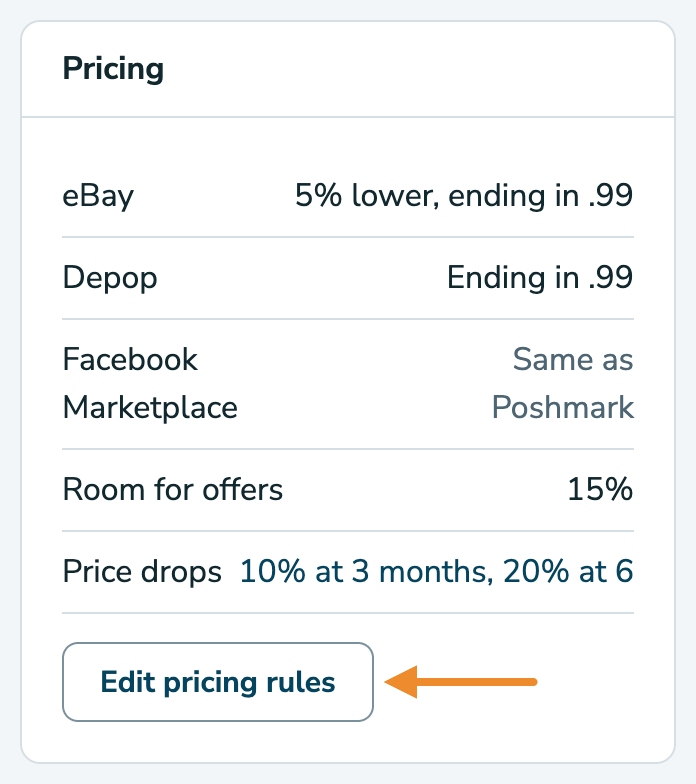
- eBay: 5% lower, ending in .99
- Depop: ending in .99
- Facebook Marketplace: the same as Poshmark
So a $29 item lists at $26.99 on eBay, $28.99 on Depop and $29 on Facebook Marketplace.
See your rules
Open Settings. The Pricing card lists the rule for each marketplace you sell on, in plain words. On Growth and Pro, it also shows your price drops (see Lower Prices on What Hasn't Sold).
Change a rule
- In Settings, click Edit pricing rules at the bottom of the Pricing card.
- Find the card for the marketplace. Each rule reads like a sentence, such as "List 5% lower than my Poshmark price, then add nothing and round to .99."
- Change any part of the sentence.
- Check the grey box under it. It shows what your rule does to a $29 item and a $40 item.
- Click Save on that card.
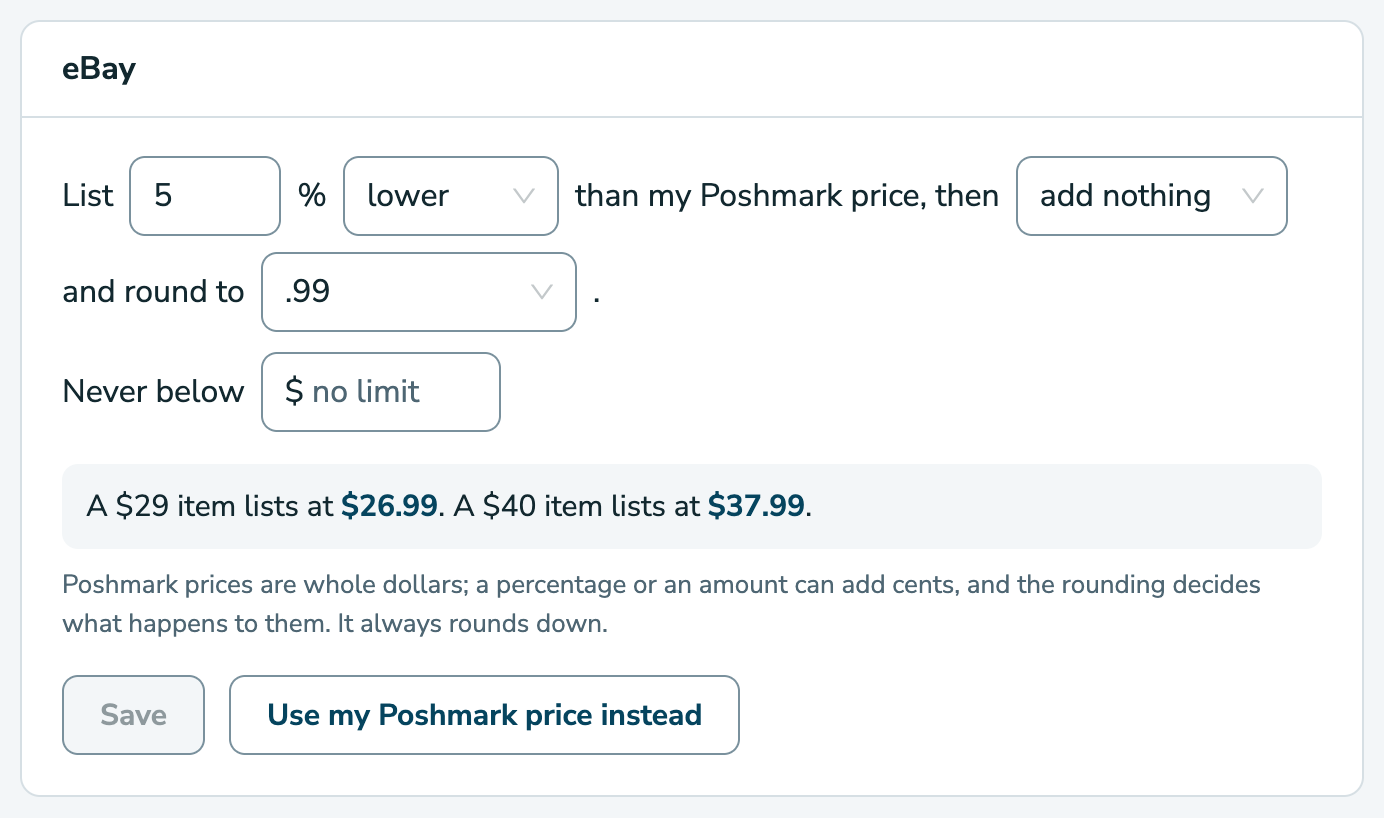
Each marketplace has its own card and its own Save button, so save each card you change.
In the sentence, you can choose:
- a percentage, and whether the price is lower or higher than on Poshmark
- add nothing, or take off or add a dollar amount, like $1
- how the price is rounded
Rounding
A percentage often leaves odd cents. 5% off $29 is $27.55, for example. Rounding decides what happens to them, and it always goes down:
- .99 makes $27.55 into $26.99.
- .95 makes it $26.95.
- whole dollars makes it $27.
- the cent leaves it at $27.55.
Facebook Marketplace only takes whole dollars, so its card has no rounding choice. RelistKit rounds its prices down to a whole dollar.
Never below
If there's a price you never want to go under on a marketplace, enter it in Never below. A rule never lists an item for less. Leave it empty for no limit.
Use your Poshmark price instead
To list at exactly your Poshmark price on a marketplace, click Use my Poshmark price instead on its card. The rule is removed straight away. To set one up again later, click Add a rule.
Room for offers
Lots of buyers make offers, and on Poshmark you can send offers to likers (people who liked your listing). Room for offers is how far above an item's likely selling price RelistKit suggests you list it, so you can accept an offer and still get the price you wanted. It starts at 15%: an item likely to sell for about $30 is suggested at $35.
RelistKit uses it when it writes a new listing for you, and when you run Price research (a look at what similar items have sold for). To change it:
- In Settings, click Edit pricing rules at the bottom of the Pricing card.
- On the Room for offers card at the top, enter a new percentage.
- Click Save.
Prices you've already set don't change.
A different price for one item
Sometimes one item needs its own price on a marketplace.
- Open the item from Inventory → Items.
- In the Platforms card, click Change next to that marketplace's price.
- Enter the price, then click Save.
The new price is for that item only, and your rule stays for everything else.
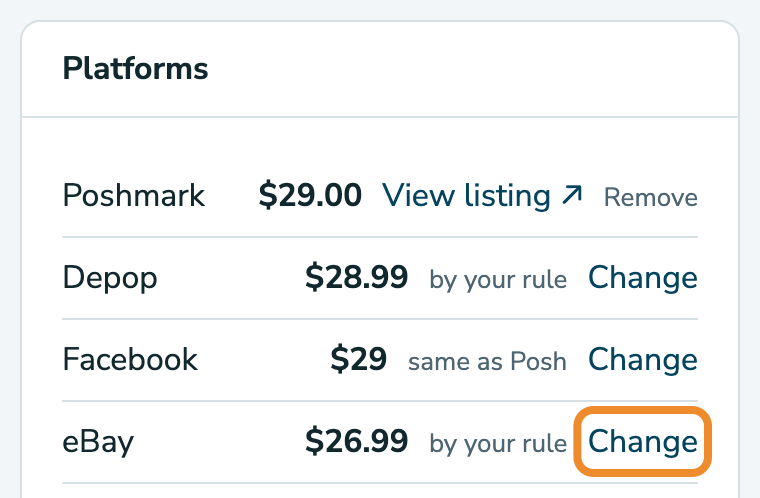
Next to each price, the Platforms card says where it came from:
- by your rule means your pricing rule worked it out.
- set for this item means you gave this item its own price.
- same as Posh means it's your Poshmark price.
To go back to your rule, click Use my rule next to the price.
When you cross-list
Cross-list the item as usual, with Cross-list to all or a single marketplace's button on the item page. The extension opens the marketplace's listing form and fills in the price from your rule, or the item's own price if you set one. Check it, change it if you like, then publish on the marketplace yourself.
Common questions
I changed a rule. Why didn't my eBay listing change?
Rules apply the next time you cross-list an item. Listings that are already up keep their price. To change one, edit it on eBay. On Growth and Pro, repricing can work out lower prices for listings that haven't sold.
Why is my $29 item $26.99 on eBay?
That's the eBay rule you start with: 5% lower, ending in .99. 5% off $29 is $27.55, and rounding to .99 brings it down to $26.99. You can change the rule on the Pricing rules page.
Why does a price end in .00 instead of .99?
That's your Never below price at work. When the rule's price comes out lower than your Never below amount, RelistKit uses your Never below amount instead. With 10% lower, rounded to .99, a $6 item would list at $4.99. With Never below set to $5, it lists at $5.00.
Can I change the price of a listing that's already up?
Not from the Platforms card. Once a listing is up, its row shows the price it was listed at, with no Change link. Change the price on the marketplace.
I'm on the Free plan. Where are my pricing rules?
Pricing rules come with Starter, Growth and Pro. On Free, every marketplace gets your Poshmark price.