
Imported Items and Duplicates
When you import your Poshmark closet, RelistKit makes sure nothing lands in your inventory twice, and points out anything that might be a second copy. This article explains the Imported from Poshmark tag, the Possible duplicate warning, and what to do about it.
Importing again never doubles up
You can import your closet as often as you like. A listing that's already in RelistKit isn't added again: the RelistKit panel (and the email when the import finishes) counts it as "already in RelistKit". RelistKit does copy down any changes you've made to it on Poshmark since, like its title, price or size. Only new listings are added as new items.
The Imported from Poshmark tag
Items that came from your closet import have an Imported from Poshmark tag at the top of the item page.

RelistKit copies imported listings exactly as you wrote them on Poshmark, and never rewrites them. Each field shows a small imported label. If you change a field, the label becomes edited, and cross-listing uses your version.
To see everything you've imported, open Inventory → Items and choose Recently imported from the dropdown at the top.
Possible duplicates
When an imported item has exactly the same title as an item already in your inventory, including one that's sold, RelistKit flags it as a Possible duplicate. Nothing is merged or deleted. It's a hint for you to check, because the same title can mean two different pieces.
To find them:
- Open Inventory and click the Items tab.
- From the dropdown at the top, choose Review possible duplicates.
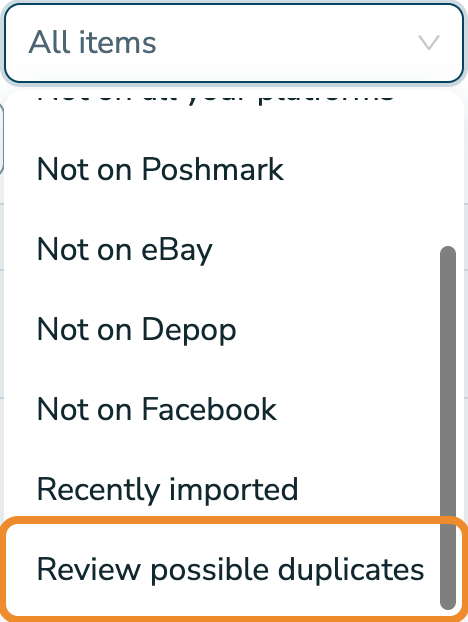
To sort one out:
- Open the flagged item. A warning under the title says which item it might be a copy of.
- Click View the other item, and compare the two.
- If they're two different pieces, click Keep both. The warning goes away.
- If it's the same piece twice, go back to the flagged item, click Delete this item at the bottom of the page, then click Delete.
Delete the item that has the warning, not the other one. If the same piece is listed twice on Poshmark, close the extra listing there too, or your next import will bring it back.
Deleting an item from RelistKit removes it and its photos from RelistKit only. Your listings on Poshmark and the other marketplaces aren't touched.
To delete several at once, tick them in the Review possible duplicates list, click the delete button that appears (it shows how many, like Delete 3 selected), then confirm.
eBay, Depop and Facebook imports
Listings you import from eBay, Depop or Facebook Marketplace are matched to your items in a different way, and any RelistKit isn't sure about wait for you on Import review. See Import from eBay, Depop and Facebook.
Common questions
Will importing my closet twice double my inventory?
No. Listings already in RelistKit aren't added again. RelistKit copies down any changes you've made to them on Poshmark.
Why is a different piece flagged?
It has exactly the same title as another item, maybe one you sold. Click Keep both.
I deleted a duplicate and it came back.
Both listings are still live on Poshmark, so the next import added it again. Close the extra listing on Poshmark, or click Keep both.
Does changing the title clear the warning?
No. Only Keep both, or deleting the flagged item, clears it.
Can RelistKit rewrite an imported listing?
No. Imported listings stay exactly as you wrote them. Edit the fields on the item page, and cross-listing uses your changes.