
Selling on Facebook Marketplace
Facebook Marketplace works like eBay and Depop for listing: one button on the item page opens Facebook's create-listing form, and RelistKit fills it in. Where it differs is the sale. Facebook sends no sale email RelistKit can read, so you record all your Marketplace sales yourself. Cross-listing to Facebook Marketplace is part of the Starter, Growth and Pro plans.
Before you start
- Facebook Marketplace is switched on under Settings → Cross-listing platforms, or its button won't show on item pages.
- You're signed in to Facebook in Chrome, with the RelistKit extension installed.
- Facebook is set to English. RelistKit finds Facebook's fields by their English names.
1. List the item
- Open the item from Inventory → Items in RelistKit.
- Under Platforms, click Cross-list on Facebook Marketplace.
- A new tab opens on Facebook's create-listing page, signed in as you. Leave the form alone until the RelistKit panel says Filled.
- Check the category and condition.
- Set delivery and location the way you always do.
- Click Facebook's Next, then Publish.
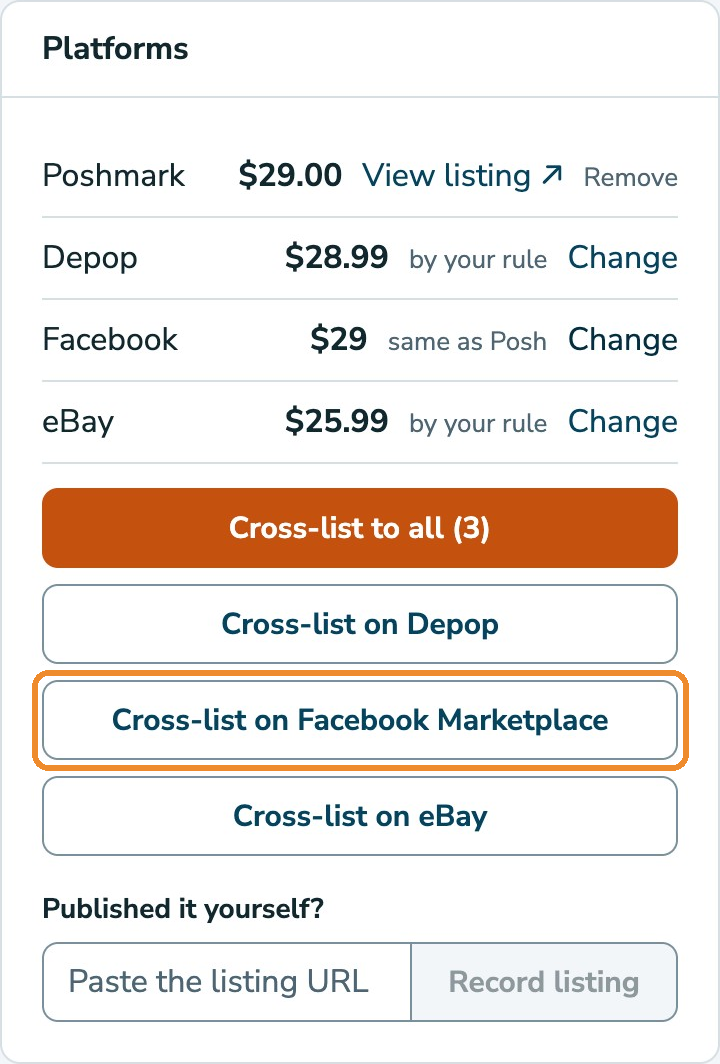
RelistKit fills in:
- the category and condition
- up to 10 photos, using your square versions (Poshmark promo graphics stay on Poshmark)
- the title and description
- the price, in whole dollars, because that's all Facebook takes
- size, colour, brand, material and age range, where Facebook asks for them
- your SKU, and product tags made from your style tags
- the item's video, if it has one
The panel reports each one. If a field didn't fill, the panel has its value with a Copy button: click it and paste the value into Facebook's field.
After you publish, RelistKit finds your new listing in the background, which can take a few minutes. Then Facebook shows as listed on the item page.
Facebook's form changes often, and reformats some fields as you leave them (a price typed as 30 shows as $30). If a field looks off, fix it before publishing.
2. Record the sale when it sells
Facebook doesn't email you anything RelistKit can read, so record the sale yourself:
- Open the item in RelistKit and click Mark as sold.
- Under Where did it sell?, choose Facebook Marketplace.
- Enter the Sold price you got, and the date under When?.
- Click Record the sale.
You can also click Record a sale under Sales, and search for the item there.
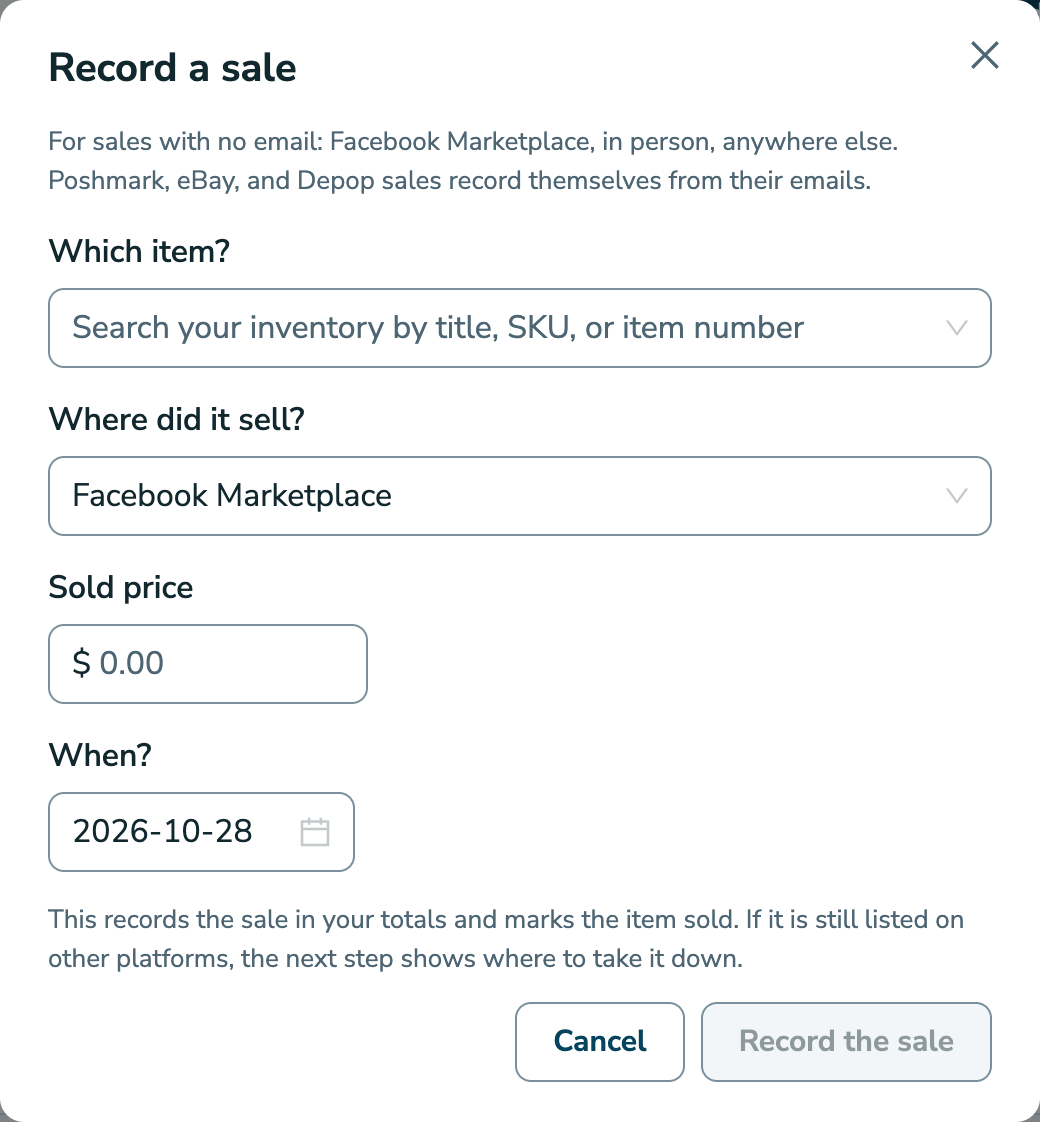
Recording the sale does three things:
- The item's status becomes Sold.
- The sale appears in your sales history with your profit.
- If you're registered for GST/HST, the tax on the sale is worked out from your settings.
If the item is still listed elsewhere, the next step shows each listing to take down, with a link to it.
Cash and in-person sales
Record these the same way, choosing Other (offline or another site) under Where did it sell?. That covers any sale that happened without an email:
- a cash sale
- a market or pop-up
- a sale to a friend
A sale recorded as Other records exactly the price you enter, with no fees or tax added.
Why Facebook and cash sales matter for tax
Three marketplaces collect and send in Canadian sales tax themselves:
- Poshmark
- eBay
- Depop
Facebook Marketplace and cash sales are yours to handle, so they're the ones that count toward the $30,000 registration threshold (see The $30,000 Threshold). Once you're registered, RelistKit works out the tax on your Facebook Marketplace sales. Choose whether your Facebook prices include the tax under Settings → Sales tax → Facebook Marketplace sales. See GST/HST: Registered or Not.
Common questions
Can RelistKit tell me when a Facebook listing sells?
No. Facebook sends no email RelistKit can use. Record the sale when it happens.
Why is my Facebook price different from Poshmark?
Facebook only takes whole dollars, so RelistKit rounds down: $27.99 becomes $27. Your pricing rules can also set a different Facebook price (see Set Your Pricing Rules).
Facebook doesn't show as listed after I published.
Give it a few minutes. If it still doesn't, go to the item page, paste the listing's address under Published it yourself?, and click Record on Facebook Marketplace.
It sold on Poshmark. Does RelistKit take down my Facebook listing?
No. RelistKit reminds you, with a link to the listing. Delete it on Facebook, then click Mark delisted on the item page.
I don't see Facebook Marketplace on my item pages.
Check that it's switched on under Settings → Cross-listing platforms. Cross-listing to Facebook needs the Starter, Growth or Pro plan.
Do I have to record cash sales?
Yes, especially if you want these to be right:
- your sales history
- your profit figures
- your tax figures
RelistKit never sees a cash sale otherwise.