
Automatic Sale Detection (Email Forwarding)
When something sells on Poshmark, eBay or Depop, the marketplace emails you. Forward those emails to your RelistKit address, and RelistKit records the sale, marks the item sold, and reminds you to take the other listings down. You set it up once, in your email, and it runs by itself after that. Automatic sale detection is part of the Starter, Growth and Pro plans.
Your forwarding address
Under Settings → Automatic sale detection in RelistKit, there's an address that's yours alone. It looks like [email protected]. Click the copy icon beside it to copy it.
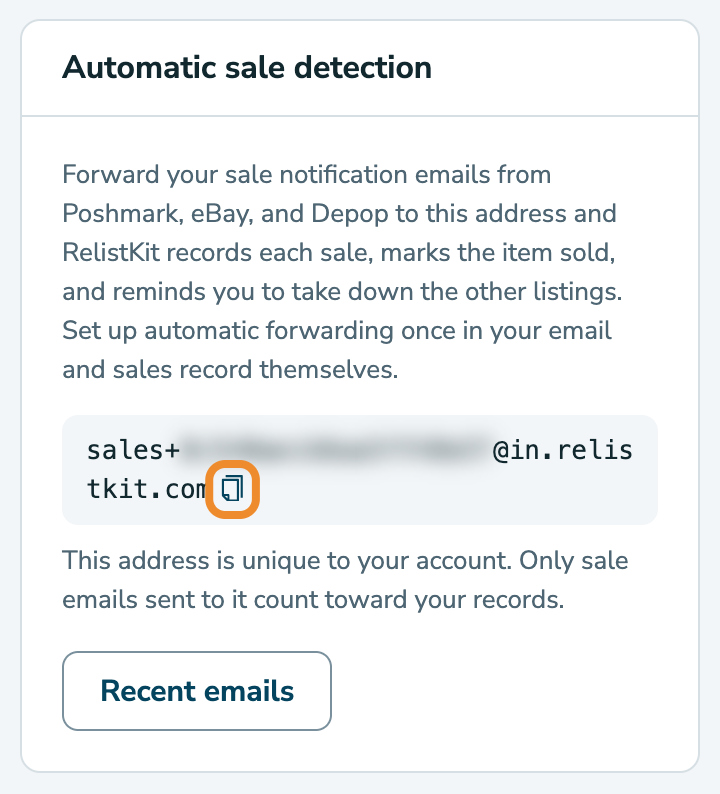
Once your email forwards sale emails to this address, RelistKit marks items as sold in your inventory automatically, and sends you links to take each item down from the other marketplaces.
Which emails to forward
Forward everything the three marketplaces send you. RelistKit keeps the sale and cancellation emails and sets the rest aside unread, so you don't need to pick and choose. These are the exact senders to match:
- Poshmark:
[email protected] - eBay:
[email protected] - Depop:
[email protected]
Cancellation emails from the same senders are read too: a cancelled order changes the sale to Cancelled, and puts the item back to Listed. Shipping, delivery, offer, deposit and "someone liked your item" emails are set aside unread.
Set up the rule
Use your email provider's website, not an app on your phone or computer. A rule made in an app only runs while that app is open; a rule made on the website runs on their servers, all the time. Your emails stay in your inbox: the rule forwards a copy.
Outlook.com and Hotmail
- Open outlook.live.com, click the gear at the top right, then Mail → Rules. If Outlook asks you to sign in and verify your account, do that first.
- Click Add rule, and name it
RelistKit sales. - Under Add a condition, choose From, and type
[email protected]. Press Enter so it becomes a chip. - Under Add an action, choose Forward to, and paste your RelistKit address.
- Click Save.
- Repeat for
[email protected]and[email protected], one rule each. (Outlook joins conditions with "and", so one rule with three senders would never fire.)
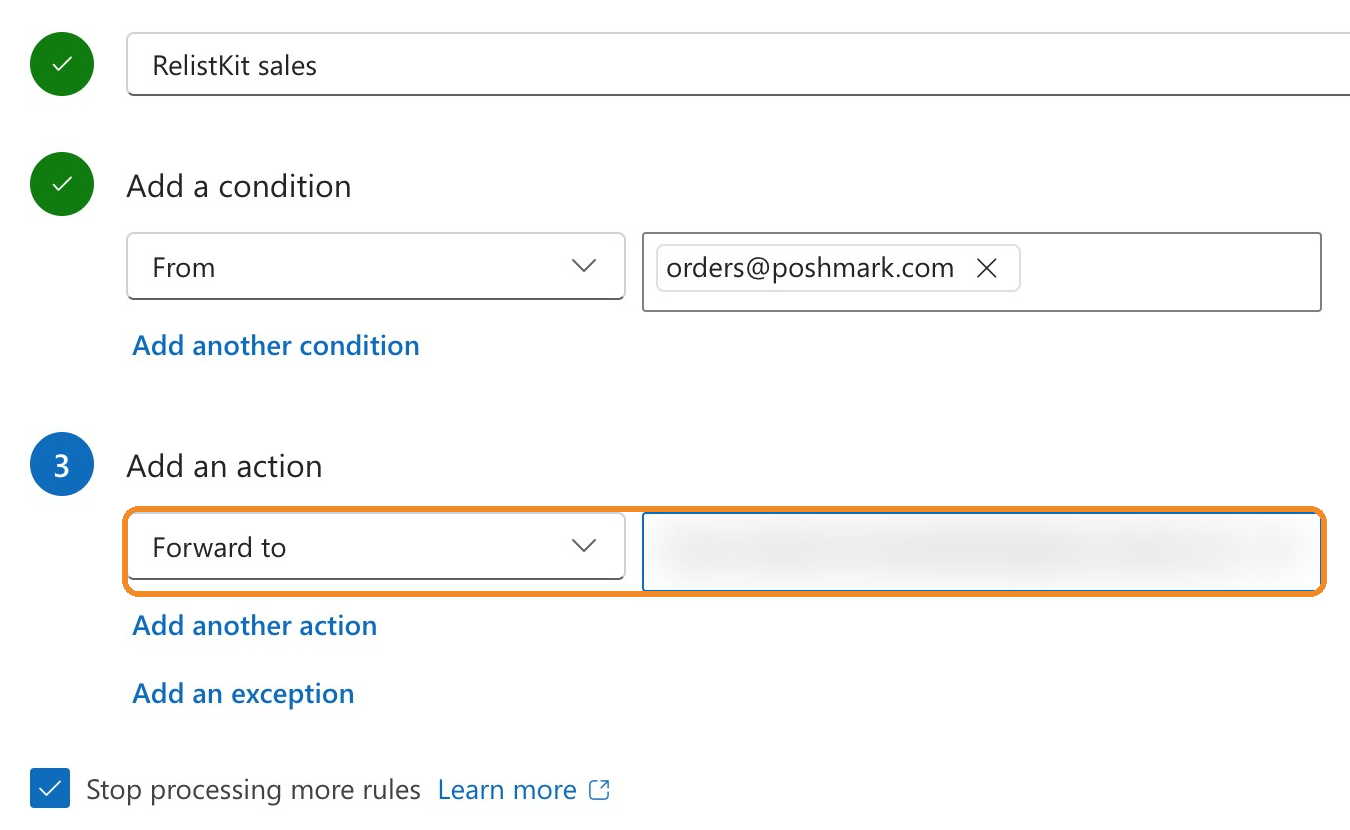
Outlook forwards to any address without asking for confirmation. Leave Outlook's separate Forwarding page alone: the rules do the forwarding.
Gmail
Gmail needs two steps: approve the address once, then make the filter.
- Open mail.google.com, click the gear, then See all settings → Forwarding and POP/IMAP.
- Click Add a forwarding address, paste your RelistKit address, and click Next, Proceed, then OK. If Google asks you to confirm it's you, go ahead. Gmail now emails a confirmation to that address.
- In RelistKit, go to Settings → Automatic sale detection and click Recent emails. Within a minute or so, a row reads Gmail asked to confirm forwarding (click Refresh if it's not there yet). Click Confirm in Gmail, then Confirm on Google's page.
- Back in Gmail's settings, go to Filters and Blocked Addresses → Create a new filter.
- In From, copy and paste this text exactly:
[email protected] OR [email protected] OR [email protected] - Click Create filter, tick Forward it to and choose your RelistKit address, then click Create filter.
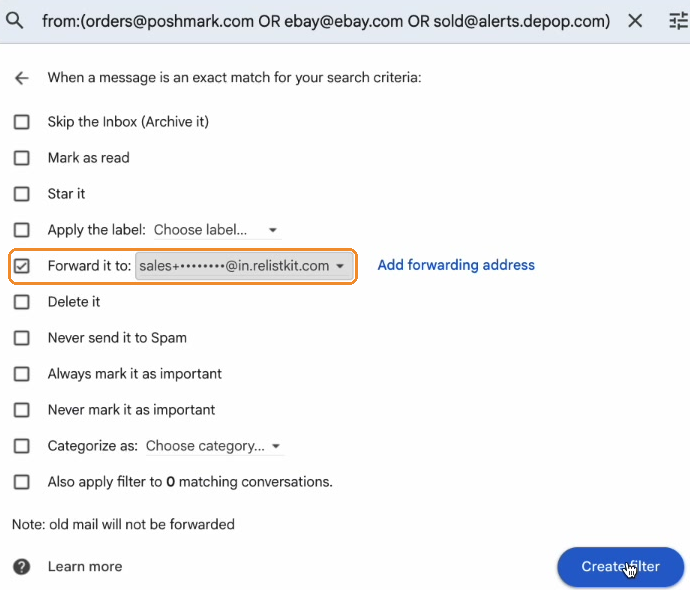
In Gmail, leave Forwarding set to Disable forwarding: turning it on would forward all your mail. The filter does the forwarding. Leave Skip the Inbox and Delete it unticked.
iCloud Mail
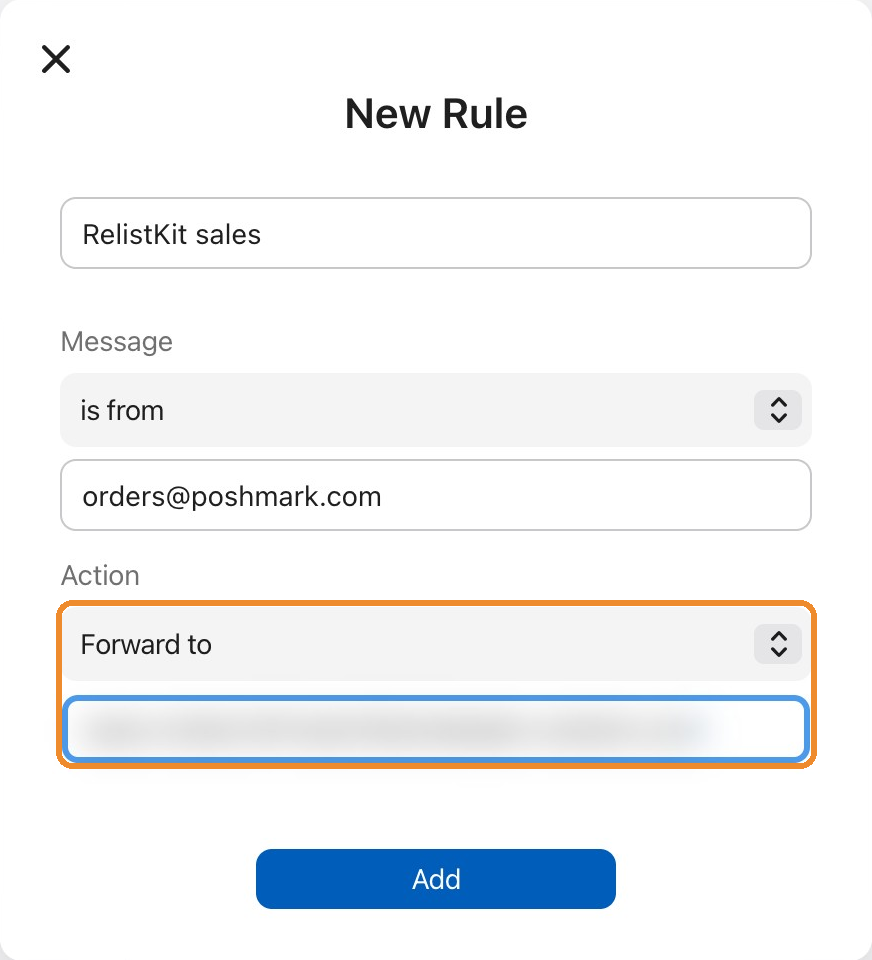
- Open icloud.com/mail, click the gear at the top of the mailbox list, then Settings → Rules.
- Click + at the top right. A New Rule window opens.
- Name it
RelistKit sales. - Under Message, leave is from, and type
[email protected]. - Under Action, change it to Forward to, and paste your RelistKit address.
- Click Add.
- Repeat for
[email protected]and[email protected].
Everything else
Any email service that can forward works. Use the rules above as a guide to set up forwarding to your RelistKit address.
Test it
Test with an email you already have, not by waiting for a sale.
- Open an old sale email from any of the three marketplaces. Pick one for an item you no longer have listed, so the test can't mark a live listing sold.
- Click Forward, paste your RelistKit address, and send it. A hand forward is fine: RelistKit reads the original sender out of the forwarded message.
- In RelistKit, go to Settings → Automatic sale detection and click Recent emails to see what happened to it.
If the item is in RelistKit, the sale shows under Sales, with the price, fees and your profit, and the item now reads Sold. If the item was never in RelistKit, which is normal for an old sale, the sale needs a review: that means the email arrived and was read correctly. Click Review, then Not my sale when you're done (see Sales That Need Review).
Check your inbox for an email from RelistKit with the subject "Sold on Poshmark: …" (or eBay, or Depop). It's only sent when the sale was matched to an item, so a test that needs review doesn't send one.
Forwarding the same sale email twice does nothing: RelistKit recognizes the order and ignores the repeat, so you can test as often as you like.
What happens on a real sale
Within a few minutes of the marketplace's email:
- the sale appears under Sales, with the price, fees and your profit
- the item's status becomes Sold
- you get the "Sold on …" email, with a Take it down everywhere else section
That section has two buttons per marketplace: one opens that listing so you can end it there, and the other marks it delisted in RelistKit. If your eBay account is connected, RelistKit ends the eBay listing for you, and the email says "Ended on eBay for you" (see Connect Your eBay Account).
eBay's sale email doesn't include its fees. With your eBay account connected, the exact fees fill in a few minutes later. Without it, they show as an estimate.
When RelistKit can't tell which item sold
Sometimes an email names an item RelistKit can't match, like a listing that was never in RelistKit, or a title that changed after listing. The sale waits for you to review: link it to the right item, or dismiss it. See Sales That Need Review.
What isn't detected
Facebook Marketplace and cash sales send no email. Record those yourself: click Record a sale under Sales (see Record a Facebook or Cash Sale).
When a sale doesn't show up
Work down this list: each step takes a minute.
- Check Recent emails. Under Settings → Automatic sale detection, click Recent emails. It shows the last emails that reached your address, and what RelistKit did with each.
- Is the rule on and saved? Open your email's rules and check it's switched on. In Outlook, rules can be switched off one by one.
- Is the address exact? Compare the address in the rule with the one in RelistKit, character by character. Copy it again if in doubt.
- Gmail only: is the forwarding address confirmed? If Gmail still shows "Verify" beside it, confirm it from Recent emails as described above.
- Did the email come from the right sender? Rules match the sender exactly. If a marketplace sent from a different address, add a rule for that address too.
- Does it need a review? Look on the Sales page before assuming it was lost.
- Was it a sale email at all? Offers, shipping and payouts are set aside on purpose. For eBay, the sale is recorded from "You got paid for …", not from "You made the sale".
Still nothing? Open a ticket under Support in RelistKit, and tell us the marketplace, the date and time of the sale email, and the address you forwarded to. We can see whether the email reached your RelistKit address and, if it did, why it was set aside. We don't read the email itself.
Common questions
Is it safe to forward my emails?
Only emails sent to your private RelistKit address are received, and only the sale and cancellation emails from the three marketplaces are read. Everything else is set aside unread. Buyer names and addresses in the emails are never shown anywhere in RelistKit.
Do I have to forward every email from those senders?
No, but it's the simplest rule, and it costs nothing: the ones that aren't sales are set aside.
Can I forward from my phone instead of making a rule?
Yes. Open the sale email, forward it to your RelistKit address, and you're done. The rule just saves you the tap.
I recorded the sale myself before the email came. Will it count twice?
No. The marketplace's figures replace yours on the same sale, and no second email is sent.
Do I get the take-down reminder for every sale?
You get the "Sold on …" email for every matched sale. If the item was only listed in one place, it says there's nothing else to take down.
I'm on the Free plan. Can sales record themselves?
Automatic sale detection comes with Starter, Growth and Pro. On Free, record sales with Record a sale. If you connect your eBay account, eBay sales are still recorded for you.