
Write a Poshmark Listing with AI
Every RelistKit listing starts as a Poshmark draft with photos and nothing else. This article is about the step where RelistKit writes the listing: what it reads, what it writes, what it refuses to guess, and what it costs. For the whole path from photos to cross-listed, see Your First Listing, Step by Step.
What RelistKit reads
The RelistKit extension only sends your photos to RelistKit when you click Generate Listing. Closing the panel before then cancels.
RelistKit's AI reviews everything it can about the item from your photos, including the brand tag, the size tag, the care label, and any flaws you photographed. It doesn't search the internet, check your other listings, or read Poshmark's suggestions.
Anything you've already typed on the draft, like a title, description, brand or size, is treated as fact. That's how to tell RelistKit something the photos can't show.
Your photos decide the quality: a clear tag photo gives you the exact brand and size, and a blurry one gives you an empty field and a note.
We recommend 8 photos per listing. That gives RelistKit enough to work with, and gives buyers enough to look at. Eight also keeps it quick: more photos take longer. RelistKit takes up to 16 photos per listing.
If one of your photos is a graphic promoting your closet, RelistKit ignores it when writing the listing, and leaves it off your cross-listings.
Before RelistKit starts
If the draft's SKU or cost is empty, RelistKit asks for them first: "Two quick fields before generating. Both are optional."
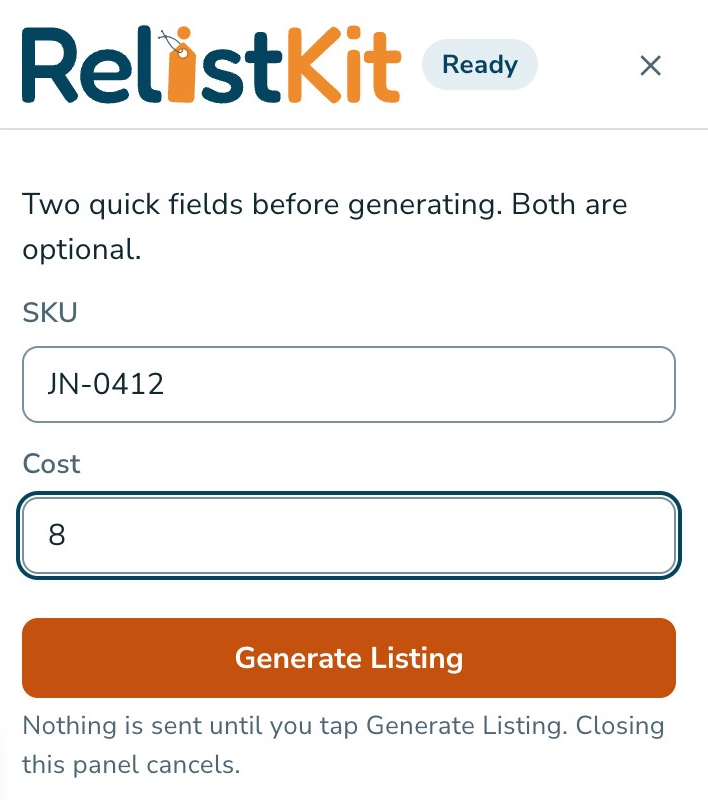
We offer this step because these details matter later, for finding the item in your inventory and for working out your profit, and they're easy to miss. We highly recommend entering them before RelistKit writes the listing.
What RelistKit writes
It takes 10 to 20 seconds. Leave the form alone until the panel says Filled. RelistKit writes into the Poshmark form:
- a title in Poshmark's style
- a description, starting with the condition, then the details a buyer asks about, like where it's made, closures, the fabric when a tag shows it, and "Measurements in photos" when a photo shows a tape measure
- the category and subcategory, size and brand
- up to two colours from Poshmark's palette
- the condition: New With Tags, Like New, Good or Fair
- one or two of Poshmark's style tags
- a starting price
It lists more than clothing, too (see Listing Things That Aren't Clothing).
The starting price and price research
The starting price is RelistKit's quick estimate of what the item will sell for, plus your room for offers (15% to start; see Set Your Pricing Rules).

For a price based on what similar items have actually sold for, click Research the price. It takes 5 to 10 seconds and uses 1 credit. Click Use this price to put it in the form.

What it never guesses
If RelistKit can't read a detail with confidence, the field stays empty and the panel says so. It won't invent a brand, a size or a material. That's deliberate: it's always better to leave out an uncertain detail than to risk a return or an unhappy buyer with wrong information.
Anything it wasn't sure about is listed under Review before publishing in the panel. Read each note, and fix anything in Poshmark's form before you publish.
The credit
RelistKit uses 1 credit each time it writes a listing. If it can't finish, no credit is used. Researching the price is another credit. Your monthly credits, and what's left, are under Credits in the app (see Plans, Credits and Billing).
Generate again uses another credit, and it doesn't start from scratch: RelistKit never types over a field that already has something in it, and it treats what's there as fact. Fix small things by hand instead. For a fresh start, clear the fields first.
Your edits win
Anything you change on Poshmark's edit page after RelistKit writes the listing is what RelistKit remembers, and what it uses when it cross-lists. Each time you cross-list, RelistKit reads your live Poshmark listing first.
On the item page in RelistKit, each field has a tag: AI for what RelistKit wrote, and edited for what you changed, so you can tell them apart.
Listings that are already live
Open a live listing's edit page on Poshmark, and the panel is there too. Click Add to inventory to bring it into RelistKit, or Add + generate details to also have RelistKit write fresh suggestions. Nothing on a live listing changes: the suggestions are in the panel for you to copy.
Common questions
It wrote the wrong brand.
Change it in the form. If it happens again and again with a well-known brand, let us know through Support in the top menu.
Can I keep my own description style?
Yes. Edit freely, or write the description yourself before RelistKit writes the rest. Your text always stays.
Does writing a listing publish anything?
No. Nothing goes live until you click Poshmark's own button.
I clicked Generate again, but nothing changed.
RelistKit never types over a field that already has something in it. The new suggestions are in the panel: click Copy beside one and paste it in, or clear the fields first.
I left the draft before publishing. Is the listing lost?
No. Open the draft again, click the RelistKit button, and click Fill the form. No credit is used.
Why does it say "Gray", not "Grey"?
Listings use US spelling, which most Poshmark buyers search with.